


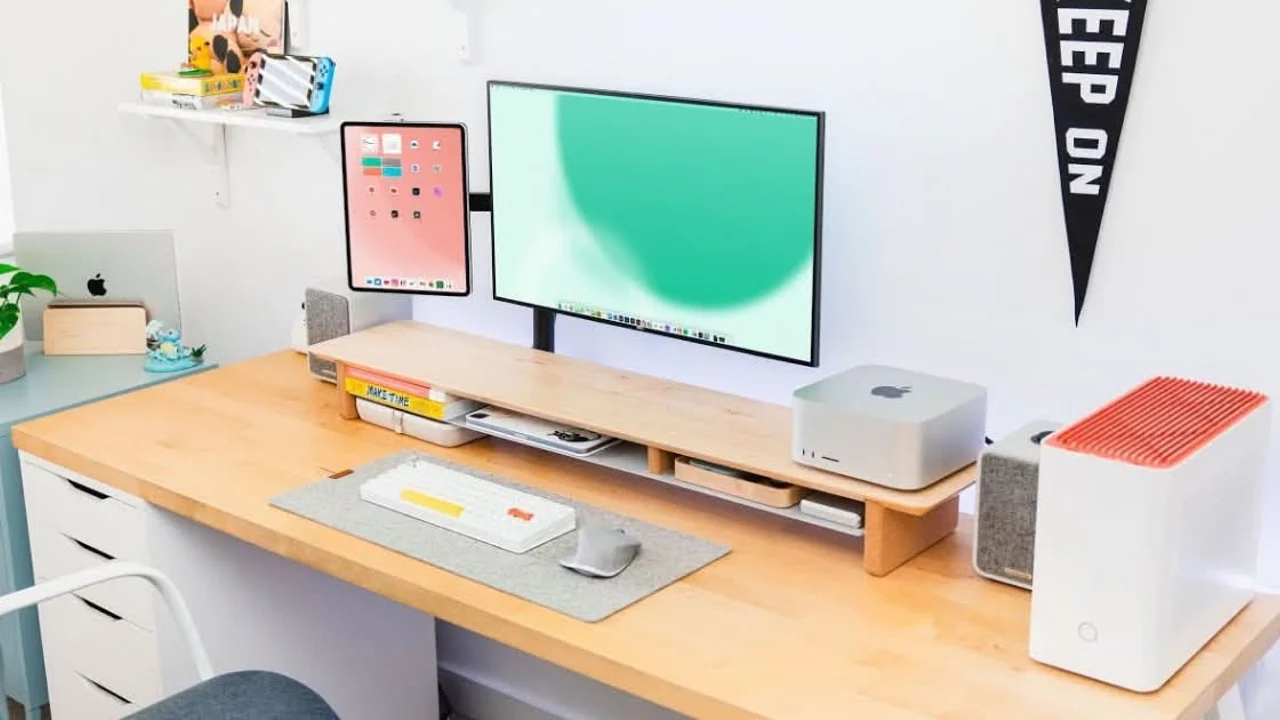


Who is Tom Hitchins?
- Tom Hitchins runs the Byte Review YouTube channel, which focuses on productivity app reviews, tech comparisons, and workflow optimization. He tests productivity tools full-time, diving deep into features most reviewers skip over.
- What makes his reviews valuable is the long-term testing. Not just 'I used this app for two days' content. He actually uses tools for weeks or months before forming opinions, catching issues that only surface with real use.
- The irony is he's tested hundreds of productivity apps but only uses six daily. The Tom Hitchins tools list is stupidly minimal for someone who reviews apps professionally. Turns out when you've tested everything, you realize most tools are solving problems you don't actually have.
- His stack reflects practical creator needs: Microsoft To-Do for tasks, Notion for content planning, Goodnotes for brainstorming, Google Drive for storage, Shortcuts for automation, Lightroom for thumbnails. Nothing fancy, just tools that handle the daily grind of making YouTube videos.
Microsoft To-Do for Daily Tasks
- After testing basically every task manager on the market, Tom settled on Microsoft To-Do. Not because it has the most features (it doesn't), but because it does exactly what he needs without extra noise.
- The 'My Day' feature is the killer workflow. Every morning, drag tasks from the main list into today's view. Keeps focus on what's actually happening today instead of drowning in a massive backlog of someday tasks.
- Outlook integration turns emails into tasks with one click. Sponsor inquiry comes in? Right-click, add to To-Do, move on. The email context stays attached to the task so nothing gets lost when following up days later.
- For a solo creator, the simplicity wins. No team features to ignore, no complex project hierarchies, no integrations with tools he doesn't use. Just lists, tasks, and a daily view. Gets out of the way and lets him work.

Microsoft To-Do is a to-do list application that can be used to manage lists & tasks.
Notion for Video Content
- Notion serves as the content hub for everything video-related. Script drafts, research notes, app comparison data, sponsor tracking, video ideas queue. All organized in databases that connect related content.
- The video database tracks status from idea to published. Columns for planned, scripted, filming, editing, scheduled, published. One glance shows exactly where every video sits in the pipeline.
- Templates speed up recurring content. App review template has the standard structure - intro, features, pricing, alternatives, verdict. Fill in the blanks instead of rebuilding the outline every time. Small time savings that compound across 50+ videos per year.
- Sponsor information lives in a separate database linked to video projects. Track which sponsors ran in which videos, payment status, contract details. Makes renewals easier when you can see the full history at a glance.

iPad Note-Taking with Goodnotes
- Among the Tom Hitchins productivity apps, Goodnotes handles the creative brainstorming that doesn't work well typed. Initial app exploration notes, video structure sketches, thumbnail concepts.
- When testing a new app for review, he'll handwrite notes on iPad while exploring features. The pen-and-paper feel keeps the flow going without switching between the app being tested and a note-taking app on the side.
- Handwriting recognition converts notes to searchable text later. Scribbled something about a specific feature during testing? Search finds it instantly weeks later when scripting the review video.
- PDF annotation works well for reviewing sponsor contracts and app documentation. Mark up the PDF with notes and signatures, export back to the original format. Beats printing, signing, scanning like it's 2005.
Automation & Storage Solutions
- Shortcuts automates the repetitive stuff that comes with creating app review content. Batch resizing screenshots for thumbnails, converting screen recordings to specific formats, triggering multi-step workflows.
- Custom shortcuts speed up app testing. One tap opens the app being reviewed, starts a screen recording, sets a timer for the testing session. Another shortcut exports all screenshots from today to a specific folder. Actions that would take minutes get done in seconds.
- He's shared some of these shortcuts on the channel. The response is always interesting - half the audience loves automation, the other half finds it too nerdy and just does things manually. Both approaches work, depends on your brain.
- Google Drive handles the storage nightmare that comes with video production. Raw 4K footage eats storage fast. The 2TB plan holds months of content without constantly deleting files to free space.
- Automatic backup prevents disasters. Local drive fails? Everything's in Drive. Accidentally delete a project file? Restore from Drive. Shared folders with editors mean collaborators access files directly without massive uploads and downloads.
- Lightroom edits thumbnails and Instagram content. Preset workflows make the editing consistent across videos. Same color grading, same crop ratios, same export settings. The mobile app edits photos on the go before posting to social.
Frequently Asked Questions About Tom Hitchins's Stack
What productivity apps does Tom Hitchins use?
Microsoft To-Do for daily tasks, Notion for content planning, Goodnotes for brainstorming, Google Drive for storage, Shortcuts for automation, Lightroom for thumbnails. That's the complete Tom Hitchins productivity apps list. Just six tools for someone who reviews productivity software full-time.
Why does Tom Hitchins use Microsoft To-Do?
After testing every task manager, To-Do won for simplicity. The 'My Day' feature focuses on today's work without overwhelming backlog noise. Outlook integration converts emails to tasks instantly. For solo creators, simple beats complex project management features you'll never use.
How does Tom Hitchins organize YouTube content?
Notion databases track videos from idea to published. Status columns show where each video sits in the pipeline. Templates speed up recurring content like app reviews. Sponsor tracking database links to video projects. Everything connected without duplicate entry.
Does Tom Hitchins use automation tools?
Yeah, Shortcuts handles repetitive tasks like batch resizing screenshots and converting files. Custom shortcuts trigger multi-step workflows with one tap. He's shared some on YouTube - people either love automation or find it too nerdy. Both valid.
What note-taking app does Tom Hitchins use?
Goodnotes on iPad for handwritten notes during app testing and video brainstorming. The pen-and-paper feel works better than typing for initial exploration. Handwriting recognition makes everything searchable later. PDF annotation handles contracts and documentation.
Why is Tom Hitchins's tech stack so minimal?
Because he's tested hundreds of tools and realized most solve problems you don't have. The Tom Hitchins tools are the six that survived long-term testing. When you review productivity apps professionally, you learn the difference between tools that look good and tools that actually work daily.